Why automate the NAV review?
You automate the NAV review so senior reviewers spend the morning on breaks and release, not on logins, pasting and comparing figures that agree. Once sources are set up at onboarding, files for the net asset value (NAV) review come in on a schedule or are dropped in; checks re-perform in seconds; and your reviewer signs with every figure traced.
In short
- Most of a spreadsheet morning is collection, roll-forward, re-keying and comparing numbers that already agree, not judgement on breaks.
- Industry teams still lag their own automation plans: 38% wanted to automate areas such as NAV production in 2022, and only 19% were doing so in 2025 (Alpha FMC Global Operations Survey, reported by BBH in June 2026).
- Regulators ask for limits on key elements, movements investigated, and a senior signature with evidence of the outcome.
- Automated, the checks take seconds: on our demo book, 371 checks across 6 funds run in under 3 seconds, measured.
- Your accounting system keeps preparing the NAV. The reviewer gets the morning back for breaks and release, with every figure evidenced. The mechanical build-up around the checks is what leaves.
What does it mean to automate the NAV review?
To automate the NAV review is to take the pre-release checks a fund administrator already runs, and remove the manual steps around them. A NAV review is the set of checks on a prepared NAV before release: cash, positions, prices, FX, fees, accruals, capital activity and the movement in the NAV itself. The reviewer does not recalculate the NAV. They test it against its sources.
A break is a difference above the tolerance the firm set for that check on that fund. Automation does not invent new controls. It re-performs the checks you need, with your own tolerances, and puts the breaks in front of the reviewer ranked by their impact on the NAV. For the process itself, start with what is NAV reconciliation.
The files are the first gain. At onboarding, each source is set up to be collected on a schedule: secure file transfer, a direct connection or a mailbox pickup into your own tenant. A source that is not connected yet is dropped in. Either way, NavRecs reads the exported files your systems already produce, with nothing migrated and nothing written back to the accounting system.
How much of a morning review is mechanical work?
On one desk we studied closely, our own estimate was around ten senior hours a day across its funds. Roughly nine of those went on collection, logins, re-keying, roll-forwards and comparing numbers that already agreed. About one hour was judgement. That is one desk, our own count, not a survey.
That is why "up to 90% of the morning's review time" is the right way to talk about the gain. The nine hours are real work, but they are not the work a senior signature is for. The hour of judgement is. When the mechanical steps leave, that hour stays, with the evidence already in front of the reviewer.
If the morning still lives in a workbook, the seven manual steps are spelled out in NAV review in Excel. The business case here is simpler: most of the cost never appears on an invoice, and most of it is not judgement.
What do industry surveys say about automation?
They say the ambition is ahead of the delivery. In 2022, 38% of industry teams told Alpha FMC's Global Operations Survey that they wanted to automate areas such as NAV production. The 2025 wave of the same survey found only 19% were doing so, a gap BBH reported in June 2026.
Both waves counted industry teams, not fund administrators alone. Our view is that the administrator side of the gap is at least as wide, because at an administrator the workbook is not a check on the review. It is the review.
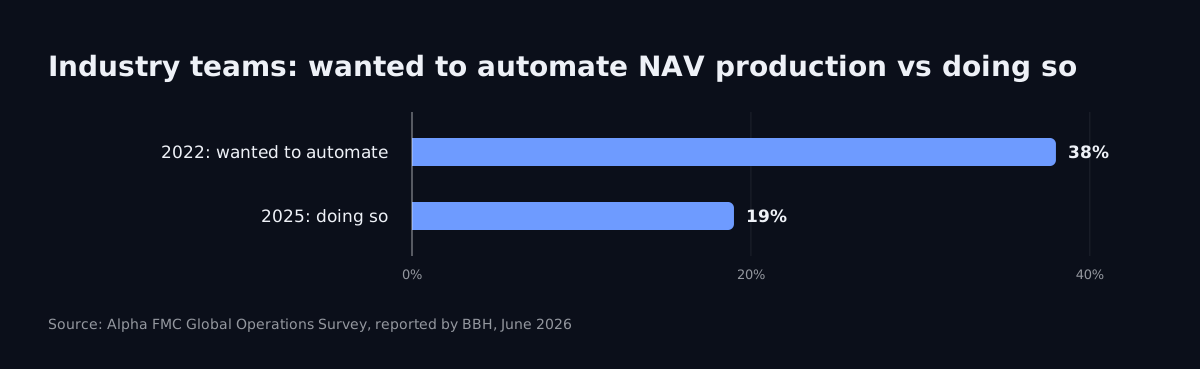
The survey gap is not a reason to wait for a perfect market. It is a reason to treat the morning as a controlled process with a measurable mechanical load, and to ask what that load costs in senior hours and in missing evidence.
What evidence do regulators and auditors expect?
Documented controls, investigated movements, and evidence that a senior person looked. Guernsey's regulator wrote it down in November 2021 in its guidance on pricing controls. Its definition of Manager starts with "the designated administrator", so it is written for the administrator's desk. Paragraph 2.11 says:
Managers should set a limit for certain key elements of a valuation such that any movement beyond that limit is investigated and the investigation and evidence of the outcome should be evidenced by the signature of a suitably senior member of staff. Such key elements include: share/unit price; stock prices; exchange rates; income accruals and expenses, and tax.
The same note asks for unchanged prices to be investigated (2.11), cash reconciled at the bank regularly (2.12), units in issue reconciled to the register at least monthly (2.13), and a cut-off procedure against omissions or duplications (2.5). Read as a list, that is a NAV review checklist.
In Luxembourg, CSSF Circular 24/856 has applied since 1 January 2025 and sets out how NAV calculation errors are to be classed, documented and reported. The thresholds by fund type are a post of their own. The regulator's text is the authority; check it with your compliance function.
An auditor testing the control asks five things: what was compared, to what, at which tolerance, by whom, and when. Initials in a cell answer one of the five. An append-only, tamper-evident audit trail answers all five as the work is done.

What does a fund administrator gain from NAV review software?
Senior hours back on judgement, breaks ranked by impact, and a record that already answers the auditor. That is the gain list. Nothing on it requires replacing the accounting system.
| Each morning | Manual review | Automated review |
|---|---|---|
| Getting the files | Logins, downloads, paste | Collected per source on a schedule once set up at onboarding, or dropped in |
| Comparing | Formulas across rolled-forward tabs | Every check re-performed in seconds |
| Finding the work | Every row, including the ones that agree | Only the breaks, ranked by their impact on the NAV |
| Evidence | Initials in a cell | Every figure one click from the cell it came from |
| The record | Workbook versions and emails | An append-only, tamper-evident (hash-chained) audit trail |
| Sign-off | The reviewer signs from a workbook | The reviewer signs, with every figure evidenced |
In NavRecs, every check re-performs in seconds: on our demo book, 371 checks across 6 funds run in under 3 seconds, measured. The checks you need ship with the product: 18 shipped, switched on or off per fund, new checks built on request. Every check is mapped to the GFSC's pricing controls guidance (November 2021) and CSSF Circular 24/856. The detail of the checks NavRecs runs is on the checks page.

For the screen-by-screen walkthrough of those gains, read what automated NAV reconciliation looks like.
Does automating the review replace your accounting system or your reviewer?
No. Your accounting system keeps preparing the NAV. NavRecs reads exported files only and never writes to that system. The reviewer keeps the release decision, with breaks ranked by impact and every figure one click from its source cell.
What leaves is the mechanical build-up, not the judgement.
The engine is deterministic: same files, same answer, every time, with no generative AI in the numbers. The whole run sits inside your own Microsoft tenant: no outbound internet calls, nothing leaves it, and we never see your data. Sign-in is Microsoft Entra with your own two-factor; users are unlimited; pricing is by fund count, not by seat.
That separation is the point of the control. The calculation and the review stay apart. Automating the review makes the second job faster and more evidenced. It does not fold it back into the first.
How should you evaluate a move to automate the NAV review process?
Start with your own morning, not a feature list. Count the hours that go on collection, roll-forward, re-keying and agreeing rows. Count the breaks that need judgement. Ask whether an auditor could answer what was compared, to what, at which tolerance, by whom and when, without reconstructing an email pack.
Then run a parallel pilot against that morning, with pass criteria in writing and corrections at no cost. Setup takes weeks, not days, for a client on a common accounting system. One copy per client, single-tenant by construction. NavRecs is the first NAV reconciliation solution built for fund administrators of every size, including the desks left with the spreadsheet when the enterprise platforms were built for hundreds of funds.
NavRecs: automated NAV (net asset value) reconciliation software for fund administrators.
Book a 20-minute demo. Your own morning, run on sample data.
Frequently asked questions
Is automating the NAV review the same as automating NAV calculation?
No. The accounting system calculates the NAV. Automating the review checks that prepared NAV against its sources before release. The two jobs stay separate, and the separation is the control.
Does the reviewer keep the release decision?
Yes. Automation ranks the breaks and traces every figure to its source cell, so the reviewer makes the call with the evidence already in front of them.
Do the files arrive without portal logins?
Yes, once each source is set up at onboarding to be collected on a schedule. A source that is not connected yet is dropped in. Either way, the tool reads the exported files your systems already produce.
How long does setup take?
Weeks, for a client on a common accounting system. A pilot is a parallel run against your own morning, with pass criteria in writing and corrections at no cost.
Where should we start if we still run the review in Excel?
Read the numbers and the seven manual steps in the Excel post, then the screen-by-screen walkthrough of an automated morning. Come to a demo with one dealing day's file set and the tolerances you already use.
See the checks NavRecs runs every morning → The checks
How it stays inside your own tenant → Security